


Babyname
3.61.44K Reviews
App Specs
- Version
- 3.4.5
- Updated On
- License
- Free
- Downloads
- 500,000+
- Developer
- DoSomethingGood
- Categories
- Parenting
- Platform
- Android, iOS
Screenshots


 Analysis by AppCompare
Choosing a baby’s name can turn a short list into a long-running family discussion. I found Babyname most useful as a way to make that discussion more focused: instead of debating every possibility at once, you and your partner can react to names individually and see where your preferences meet. That makes it a playful tool for narrowing options, rather than a replacement for the more personal conversations that choosing a name eventually requires.
What the free access does—and does not mean
Babyname is a free parenting app from DoSomethingGood, and its basic appeal is easy to understand: it gives two people a shared activity for exploring names. There are in-app purchases priced from $0.99 to $7.99 per item, so free to download does not mean every possible purchase is included. I’d start by using the free experience and decide whether anything beyond it matters to your process before spending money. The price range alone doesn’t tell you which purchase is worthwhile, so I wouldn’t treat an add-on as necessary just because you’re serious about finding a name.
The app is rated for Everyone, and it has an average rating of 3.7 from around 10,000 ratings, alongside roughly 1,400 written reviews. More than 500,000 installs suggest that plenty of people have tried it, but popularity doesn’t guarantee that its approach will fit your family. I’d judge it by whether sharing reactions makes your conversations easier, not by its rating or install count.
Swipe Right, Swipe Left: The Tinder for Baby Names
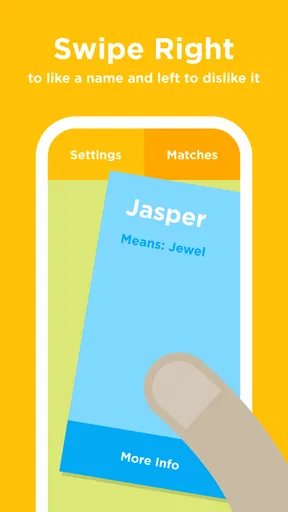
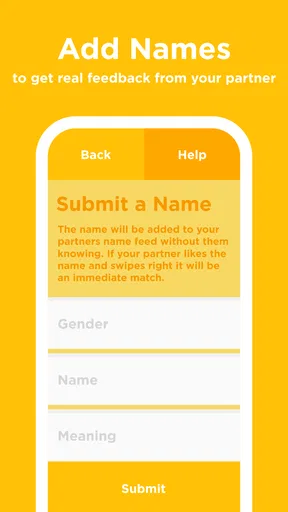
So, I downloaded Babyname and jumped right in. The app’s concept is refreshingly simple: swipe right if you like a name and left if you don’t. And guess what? Your partner can do the same. The magic happens when you both swipe right on the same name—it’s a match! This feature adds a fun, collaborative twist to what can often be a solo endeavor.
The names are displayed one by one, and it’s almost addictive to keep swiping. I found myself getting caught up, just like on a dating app. The interface is clean and intuitive, making it easy for anyone to pick up and start swiping immediately.
All in the Details
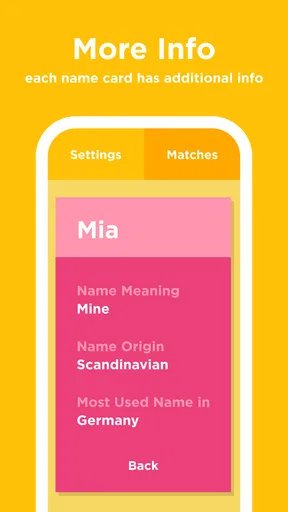
One of the features I appreciated was the detailed descriptions accompanying each name. Not only do you get a name, but also its origin and meaning. This can be a game-changer if you’re looking for something with a particular cultural significance or a meaning that resonates with your family values.
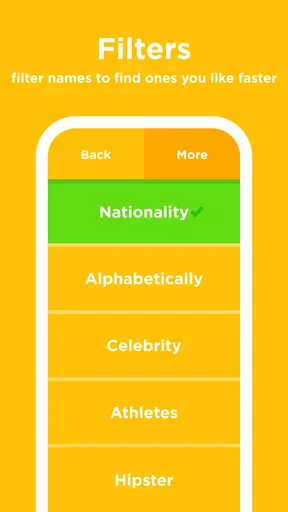
There’s also a handy feature to filter names by gender, or even go for unisex options if that’s your style. The filters aren’t overly complex, which keeps the experience straightforward and enjoyable.
Worth Reading Before You Choose

EA SPORTS FC Mobile 26 Is a Bigger Football Game, but It Takes Time

Flipboard Shows What News Apps Must Do Beyond the Feed

Switching to Android Auto Means Rethinking Your Driving Routine

Google Calendar Makes a Crowded Week Easier to Manage

Ludo King Makes the Most of the Minutes Between Plans

Baby Panda World Brings Quick Play to Modern Phones, but Its Game Library Feels Busy
Making the most of a shared shortlist
The swipe format works best when both people treat it as a first pass, not a final vote. I’d have each partner swipe separately before comparing matches. That keeps one person’s enthusiasm—or hesitation—from steering the other’s choices in the moment, and it makes the overlap more revealing. A mutual like is a useful signal that a name deserves a closer look, but it isn’t proof that it suits your family in every way.
When a match appears, I’d pause before moving on and say the name aloud with the family name. Try it in a casual introduction, imagine calling it across a playground, and check whether its pronunciation feels natural to the people who will use it. The app helps surface shared interest; saying a name in ordinary contexts helps you decide whether that interest holds up outside the swipe screen.
It can also help to separate “maybe” names from definite favorites in your own conversation. A quick swipe is an instinctive response, and instincts are useful for discovery, but a name’s meaning, spelling, pronunciation, and family associations need more thought. I’d use the app to create candidates, then take a short list away from the phone and talk through the details without turning every reaction into a verdict.
A Collaborative Experience
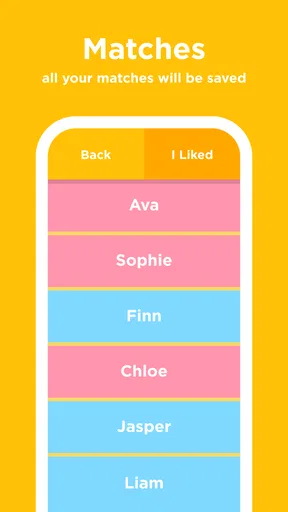
The app really shines with its shared lists. You can invite your partner to join in on the fun, and both of you can compare your choices. It’s a great way to ensure both parents have a say, and it can even spark some interesting conversations. Imagine discovering that you both secretly love the name "Luna," even though it wasn’t on your original list!
If you’re feeling stuck, there’s a random name generator to shake things up. You might stumble across that perfect name you hadn’t even considered.
When a name needs more than a quick reaction
The generator is most useful when you have run out of ideas, not when you already have a clear direction. I’d use it in a short, low-pressure session: look at unfamiliar suggestions, save the ones that prompt curiosity, and leave the rest behind. That turns randomness into a way to discover new possibilities rather than a demand to like whatever appears.
Likewise, the origin and meaning shown with a name can give you a better starting point for research, but I wouldn’t make a decision on a short description alone. If cultural background matters to you, consider how the name is used in your family or community and whether its pronunciation and associations feel right. A brief in-app explanation can help you ask better questions; it cannot decide what a name means to your relatives or to the child who will carry it.
One practical trade-off is that swiping encourages fast, individual judgments. That is the source of much of the fun, but it can also make a thoughtful choice feel like a popularity contest between two people. If one partner is more decisive or spends more time browsing, agree that neither person has to defend a left swipe immediately. Save the discussion for the names both of you want to revisit, and allow either person to raise a name outside the app if it matters for a reason the swipe format cannot capture.
How it compares with lists and name books
Compared with keeping a shared note or spreadsheet, Babyname makes the first round more interactive and gives each partner a way to react independently. A note is better if you want to add your own comments, family connections, spelling alternatives, or reminders about why a name appealed to you. The app’s swipe-and-match approach is stronger when the main problem is getting two people to engage with the same pool of choices rather than keeping detailed research in one place.
Compared with browsing a name book or a general online list, its collaborative angle is the distinctive part. Traditional lists can be easier to scan by letter, theme, or other criteria, while the app presents names one at a time and asks for a quick response. I’d use Babyname for discovery and shared reactions, then use a more open-ended reference or a family conversation to check a candidate thoroughly. If you already have a shortlist and mainly need reliable background research, a reference source may be a better fit than repeated swiping.
There is also a difference between finding overlap and reaching agreement. Two people can like the same name for different reasons, and a match won’t settle questions about pronunciation, spelling, relatives’ reactions, or how the name pairs with a middle or family name. I see the shared list as a conversation starter, not a complete decision-making system. That distinction matters most when the process is emotionally charged or when family members have strong expectations.
Who gets the most value
I’d recommend it to expectant parents who enjoy trying options together and want an easy way to uncover overlap without presenting each other with a long list. It can also suit couples at the beginning of the search, when neither person knows what style they prefer. The filters and generator give that exploration some direction, while the shared experience can make an otherwise repetitive task feel lighter.
It may be less useful if you are choosing alone, if you already have a firm shortlist, or if your decision depends chiefly on detailed cultural, linguistic, or family research. The app’s strongest idea is two people reacting to names and finding common ground, so a solo user loses much of that particular benefit. Someone who dislikes swipe-based browsing may also prefer a searchable list or a notebook where names can be compared side by side.
A realistic way to use it is during a quiet evening when both partners have a few minutes, rather than while one person is busy and the other is waiting for decisions. Each person can make independent choices, then discuss the matches and note which ones deserve a second look. If the conversation starts to feel tiring, stop and return later. A short session can reveal useful patterns in your tastes without making the whole naming process feel like a task to finish in one sitting.
Version, compatibility, and everyday expectations
The current version is 3.4.0, and the app requires Android 7.0 or later. It was released on February 2, 2015, so it has been around for years, although that history by itself doesn’t tell me how well it will fit a particular device or household. Before building a shared routine around it, I’d check that the phone you plan to use meets the operating-system requirement and that your partner is comfortable using the same app.
Because the central activity involves two people, it’s worth agreeing on how you’ll use the shared list before you begin. Decide whether you want to browse together or separately, and whether a match means “save for later” rather than “this is the name.” That small expectation-setting step can prevent an entertaining feature from creating pressure, especially when one person is ready to decide and the other wants more time.
For value, I’d keep the purchase question simple: the app is free to start, with optional in-app purchases in the stated price range. Try the core naming workflow first. If it already gives you a useful shortlist and better conversations, you may not need to pay for anything. If you are considering a purchase, check what it offers in the app and whether that specific addition solves a problem you actually have; don’t assume that paying is required to make the shared approach worthwhile.
Final Thoughts
Overall, I found Babyname to be a delightful tool in the baby-naming journey. It turns what can sometimes be a daunting task into something engaging and fun. It’s perfect for expectant parents who want a seamless, interactive way to find the perfect name together.
Whether you’re just starting your baby-naming adventure or are deep into the process, this app offers a fresh perspective. So, why not give it a try? You might just find that perfect name while having a bit of fun along the way.
My practical verdict is to try it if you and your partner want a light, shared way to explore possibilities, and to treat each match as an invitation to talk rather than a final answer. Skip it if what you need is a detailed research tool, a solo catalog, or a place to manage an already settled shortlist. The best value here is the chance to notice where your instincts meet; the final choice still benefits from time, context, and a conversation beyond the screen.
Pros
- Simple and intuitive interface.
- Wide selection of names.
- Personalized recommendations.
- Offline mode available.
- Easy sharing with partner.
Cons
- Limited customization options.
- Occasional app crashes.
- Ads can be intrusive.
- No pronunciation guides.
- No international name support.
FAQs for Babyname
What is Babyname and how does it work?
Babyname is a mobile app designed to help expecting parents find the perfect name for their baby. It works like a dating app, allowing users to swipe right if they like a name and left if they don’t. When both partners swipe right on the same name, it’s saved as a match in their list.
Is Babyname available on both Android and iOS devices?
Yes, Babyname is available for download on both Android and iOS platforms. You can find it in the Google Play Store for Android devices and the Apple App Store for iOS devices. Make sure your device meets the app’s minimum operating system requirements for a smooth experience.
Does Babyname offer any customization features?
Babyname offers several customization features to tailor the experience to your preferences. Users can filter names based on origin, gender, or popularity. Additionally, the app allows for personalized name lists, making it easier for couples to keep track of their favorite names and have meaningful discussions.
Are there any costs associated with using Babyname?
While Babyname offers a free version with basic features, there are in-app purchases available for users who wish to access premium features. These may include additional name lists, ad-free browsing, and advanced filtering options. Check the app store for the latest pricing details.
How secure is the data shared on Babyname?
Babyname prioritizes user privacy and data security. The app requires minimal personal information and uses encryption to protect user data. However, it’s always a good practice to review the app’s privacy policy and terms of service to understand how your data will be used and stored.


